Built around the Pi coding agent
Pi, at home
on your desktop.
A free, open source Windows interface for Pi. It renders the agent you already use, and it keeps every session, credential, and setting exactly where Pi puts them.
MIT licensed. Windows only. Releases are unsigned, so SmartScreen warns on first launch.
How NativePi is put together
Pi keeps the agent loop.
A pinned build of Pi is bundled with the app and started in RPC mode. It owns the loop, the providers, authentication, tools, prompts, skills, extensions, queues, compaction, and sessions. NativePi never makes a model request of its own.
- Sessions live in Pi's own storage, in ~/.pi/agent
- Credentials are Pi's, never held in NativePi
- The Pi CLI reads and writes the same files
One process per project, and a narrow bridge.
The Electron main process talks to Pi over JSON RPC on stdin and stdout, and exposes a constrained contextBridge to the window. Nothing else crosses. Different projects can run at the same time; a project never gets two Pi processes.
- JSON RPC over stdin and stdout
- A constrained contextBridge, not full Node access
- Optional token-protected local server for browser access
The part you actually work in.
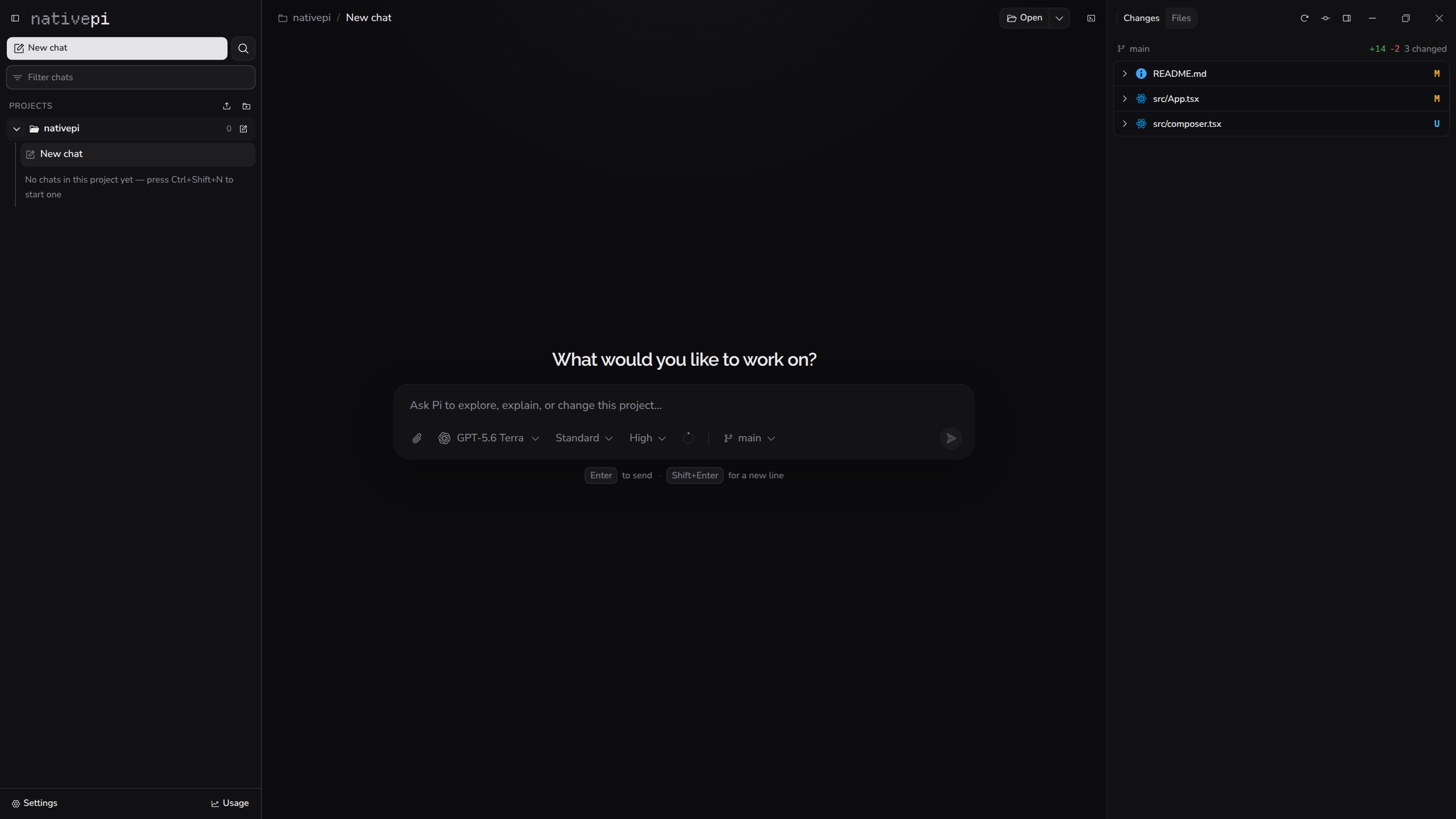
Projects, sessions, streamed responses, thinking, tool calls, file changes, and Git diffs, in one window. React 19 with the React Compiler, Tailwind, and shadcn/ui. It renders what Pi returns and adds no agent behavior of its own.
- Resizable three-pane workspace
- Rich diffs and Git status beside the transcript
- Integrated terminals, scoped per project
The app itself is hackable.
Normal Pi extensions run inside Pi, unchanged. An extension that wants the desktop surface imports @nativepi/extension-api and adds a nativepi.renderer entry. NativePi compiles it with esbuild and mounts its contributions behind error boundaries.
- Four contribution points, no core replacement
- Your components share NativePi's React instance
- Install at user or project scope
NativePi adds no providers of its own. It uses whatever Pi can authenticate.
Leave whenever
you want.
Most agent frontends replace the agent they wrap: their own loop, their own storage, their own login. NativePi does none of that.
Your sessions and credentials stay in Pi's normal storage. There is no second conversation store to migrate out of, no account to close, and no export step. The Pi command line reads and writes the same files while NativePi is open.
Everything NativePi stores on its own
- Pinned projects
- Last project and chat
- Unsent drafts
- Favorite models
- Pane sizes
- Its own interface preferences
That is the complete list. No conversations, no credentials, no telemetry, and nothing that leaves your machine.
One store. Both clients. Neither one owns it.
The app itself is hackable.
You already shape Pi with TypeScript extensions. NativePi extends that same contract into a graphical one, so the desktop surface bends to your workflow instead of the other way around.
import { defineRenderer } from "@nativepi/extension-api";
export default defineRenderer({
// Draw a tool call your own way, wherever it appears in the transcript.
tools: {
"db.query": ({ call, result, ctx }) => (
<ResultTable
sql={String(call.arguments.sql)}
rows={result?.details}
projectDir={ctx.session?.projectDir}
/>
),
},
// Add a titled panel to the context pane, beside the diff view.
panels: [
{
key: "schema",
title: "Schema",
render: (ctx) => <SchemaTree dir={ctx.session?.projectDir} />,
},
],
});Four places to contribute
Extensions reach controlled slots. They cannot replace the composer, the transcript, the sidebar, or routing, which is what keeps a broken extension from taking the window with it.
- Tool renderer
tools?: Record<string, ToolRenderer>Draw a tool call and its result your own way.
- Entry renderer
entries?: Record<string, EntryRenderer>Render a custom session entry in the transcript.
- Composer widget
composerWidgets?: ComposerWidget[]Sit directly above or below the composer.
- Context panel
panels?: Panel[]Add a titled panel to the context pane.
How it loads
Point your Pi package manifest at a browser entry. NativePi compiles it with esbuild, provides React and the API at runtime so your components share its React instance, and mounts every contribution behind an error boundary.
{
"nativepi": {
"renderer": "./src/renderer.tsx"
}
}The graphical extension API is experimental and may change between releases.
Read the extension API referenceNormal Pi extensions keep working, unchanged, with no renderer entry at all. See the package on GitHub.
One window, the whole job.
Pi does the work. NativePi makes every part of it visible, and puts the controls where you can reach them without leaving the conversation.
- Sessions
- Create, resume, rename, clone, and fork
- Import, export to HTML, and delete
- Session tree, statistics, and compaction
- Drafts survive a failed cold send
- Running a turn
- Streamed text, thinking, and tool activity
- Steer mid-run, queue a follow-up, or stop
- Retries, errors, and failed calls shown in full
- Images by paste, drag and drop, or file picker
- Code
- Git status and working-tree diffs
- Switch or create a branch from the composer
- Add a worktree as a project of its own
- Open the folder in your installed editor
- Around the work
- Project-scoped terminals that survive hiding
- Pi packages installed at user or project scope
- Pi slash commands, prompts, and skills by name
- A quit confirmation that names what it would stop
There is also an on-demand local server, protected by an access token, that presents the same projects, chats, changes, and terminals in a browser on your own network while the desktop app stays open. It is off until you start it, and it is never published to the internet.
What it does not do.
Worth knowing before you download it rather than after.
Windows only, for now
The host is Windows-first, single window, and dark only. There is no macOS or Linux build.
The installer is unsigned
Releases are not code signed yet, so Windows SmartScreen warns on first launch and you have to click through it.
Git access is deliberately narrow
Branch checkout and creation on a clean worktree, and adding worktrees. No staging, committing, merging, rebasing, discarding, or history rewriting.
The graphical API is experimental
Extension slots may change between releases. Graphical extensions are trusted code running in the window, not sandboxed code.
It is not its own agent
No agent loop, no model requests, no added tools, and no support for harnesses other than Pi. If Pi cannot do it, neither can this.
Nothing is synced
No cloud, no collaboration, no remote projects, no accounts, no paid tier, and no telemetry of any kind.
Take it apart yourself.
The whole thing is MIT licensed, from the app down to the extension contract. Read it, fork it, or bend it around the workflow you already have.
github.com/nonlooped/nativepiMade for people who already shape Pi around their workflow.